Instagram DM automation for comments, stories, and leads
Use Instagram DM automation to route Deriv partner leads, follow up with clients, and hand chats to your team when human support is needed.
Managing content, comments, direct messages, and follow-up can take up a large part of your week. Workflow automation helps you handle repeatable tasks consistently, so you can spend more time creating useful content and responding personally where it matters.
The goal is not to automate every conversation. It is to automate clear, approved first steps: sending an educational resource, sharing webinar details, recording a common question, or directing someone to the right next action. A good workflow keeps you in control. It should use approved information, make it easy for people to understand what happens next, and hand complex or sensitive conversations to a person.
Quick summary
- Automate repeatable first steps, not judgement or personalised guidance
- Start with one audience action, such as a comment, direct message, or form submission
- Use chat automation to send approved resources and capture common questions
- Use ChatGPT Work or Claude internally to plan content, draft response options, and review recurring questions
- Keep a simple spreadsheet to track workflow activity and follow-ups
- Build clear points where a person takes over
- Review every workflow for accuracy, permissions, disclosures, and local requirements
What is workflow automation?
Workflow automation is a sequence of actions that happens after a specific trigger. For example, a person comments a keyword on an Instagram Reel. Your chat tool sends a private message with an approved educational resource. If they ask a question that needs an individual response, you receive a notification and take over the conversation.
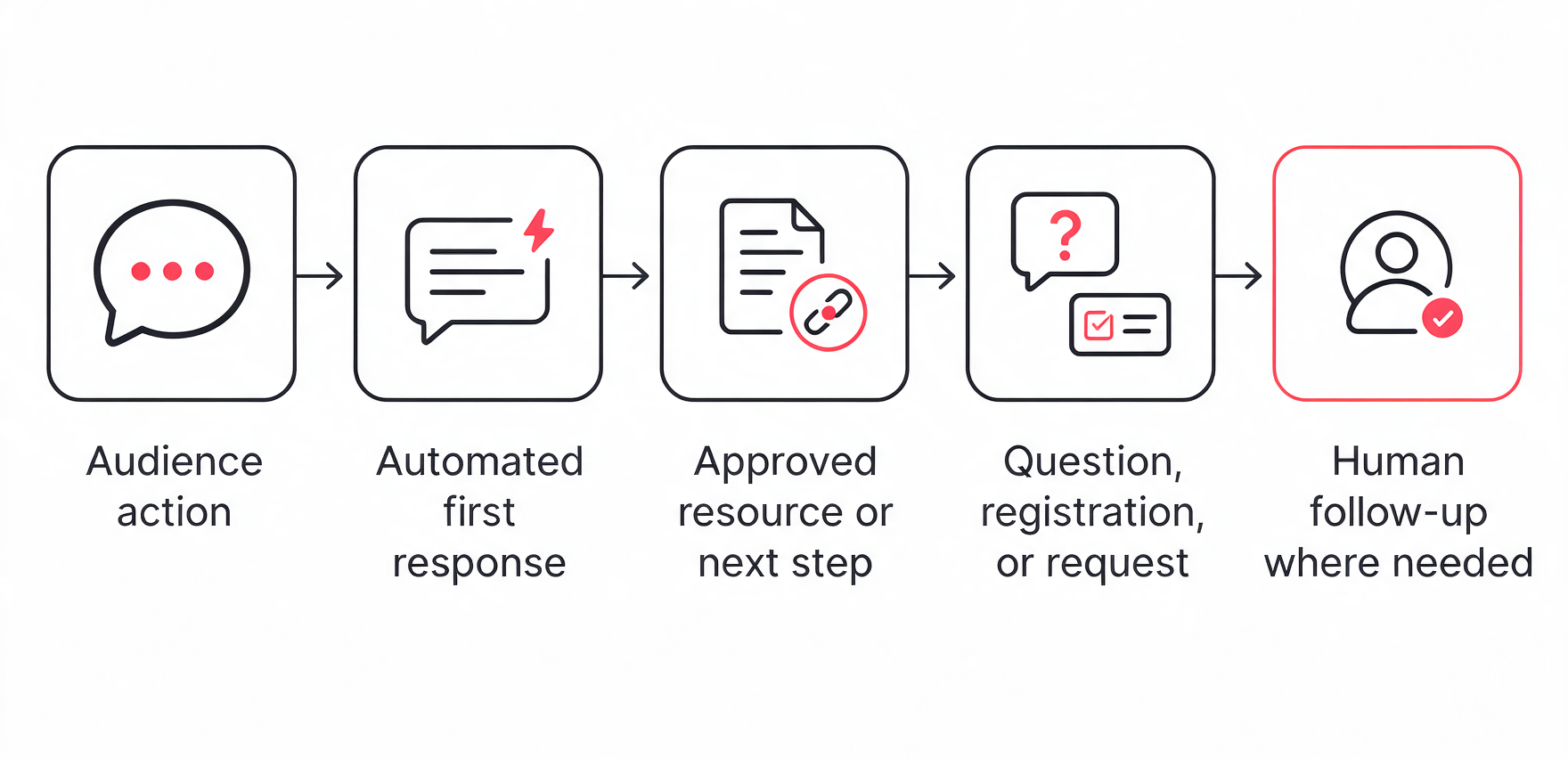
The workflow is not there to replace you. It removes repetitive admin work while keeping important decisions with you. A basic workflow often has five parts:
- Audience action
- Automated first response
- Approved resource or next step
- Question, registration, or request
- Human follow-up where needed
Start with one useful task
Do not begin by trying to automate all comments and messages. Start with one repeated task that is easy to define and review. Good starting points include:
- Sending an approved guide after someone comments a keyword
- Sharing details for an educational webinar
- Replying to a frequently asked question with an approved resource
- Recording questions that can become future content
- Directing people to an official page for more information
- Sorting incoming messages into simple categories, such as “webinar”, “platform question”, or “needs follow-up”
Avoid automating actions that need personal judgement. For example, do not use a chatbot to give trading advice, explain whether a product is suitable for someone, make promises, or resolve a complaint without human review.
Choose the right type of automation
Not every task needs AI. In many cases, a simple rule-based workflow is more accurate and easier to control.
A rule-based chat flow follows instructions you define. An AI agent can take more independent steps, such as analysing information, selecting tools, and adapting its approach. That can be useful for internal work, but it also needs more oversight. Start with a simple workflow before giving an AI tool access to sensitive information or client conversations. Anthropic’s guidance on trustworthy agents emphasises the importance of human control, transparency, and privacy when using more autonomous systems.
How to build a simple chat workflow
A practical chat workflow should answer three questions:
- What action starts the workflow?
- What approved information does the person receive?
- When should a person take over?
For Instagram, a common starting point is a comment or direct-message keyword. Manychat can connect Instagram comments and DMs to automated responses, including a public reply, private message, and a flow that directs people towards the next step. An Instagram account must be a professional account to connect it to Manychat. Read more on Manychat’s Instagram connection guide and Instagram comment trigger guide.
Before you build anything, prepare:
- The approved resource or landing page
- The exact wording for the first message
- The keyword or action that starts the workflow
- Any market-specific eligibility information
- A clear next step
- A route for questions that need human review
Worked example: invite people to an educational webinar
A webinar is one useful outcome for an automated chat workflow. The same structure can also deliver a guide, official article, educational video, or event registration page.
Imagine you publish an Instagram Reel about understanding margin and leverage. The Reel ends with a clear invitation:
Want the details for our upcoming educational webinar? Comment “WEBINAR” and we’ll send you the registration link.
The workflow could look like this:
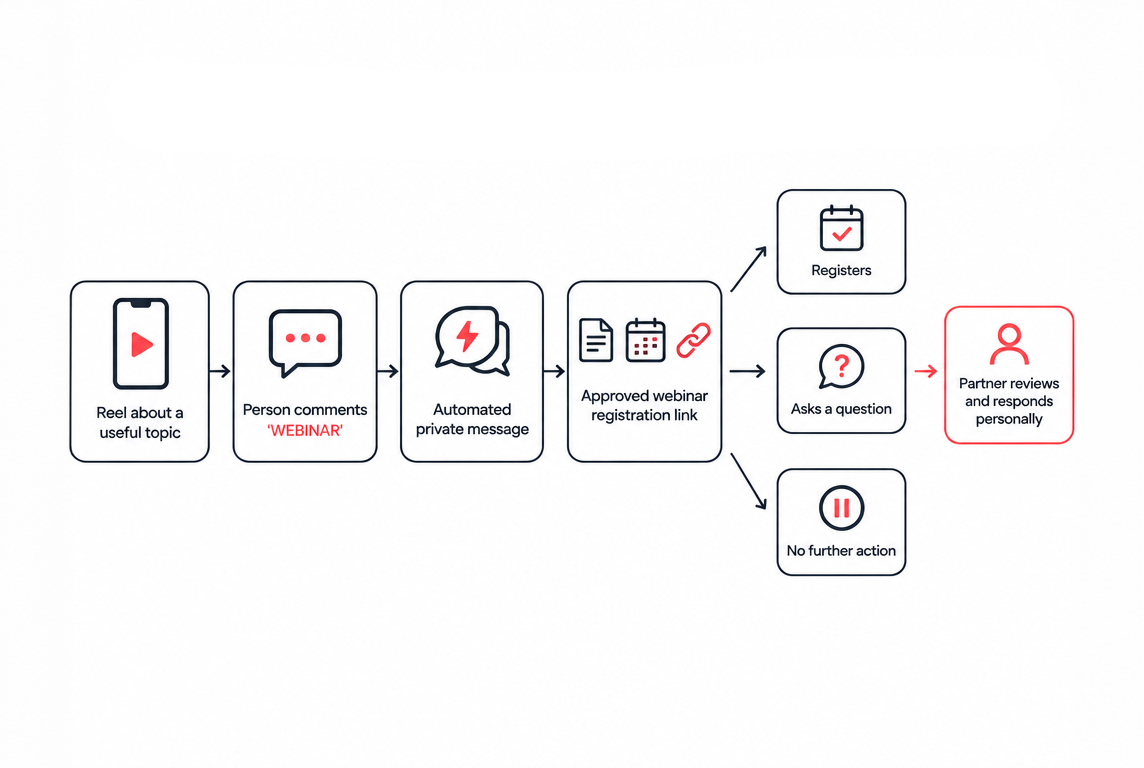
Your first automated message should be short, clear, and factual.
Thanks for your interest. Our upcoming webinar covers [approved topic]. You can view the details and register here: [approved link].
Do not add product recommendations, claims about results, or language that pressures someone to register. If the webinar is only available in certain markets, make that clear through approved wording and the official registration page.
You can then offer simple choices, such as:
- View webinar details
- See educational resources
- Ask a question
If someone chooses “Ask a question”, do not let the automation guess the answer. Ask them to share their question, then review it personally or direct them to an approved support channel.
Use chat automation to send resources, not generic replies
The strongest automated messages are useful because they match the action a person has already taken. Avoid building a catch-all chatbot that tries to answer every question. It can lose context, use wording that has not been approved, or give an incomplete response.
A better approach is to use automation for the first clear action, then involve a person when the conversation becomes specific.
Use ChatGPT Work or Claude for internal planning
ChatGPT Work and Claude can help with the work around your chat workflow. They are most useful before you publish or when you review what happened afterwards.
For example, you can use an AI assistant to:
- Group recurring questions from comments and messages
- Turn those questions into content ideas
- Draft several caption options for an approved webinar or resource
- Create alternative versions of an approved first-response message
- Summarise questions that need a personal follow-up
- Create a weekly list of content and workflow improvements
ChatGPT Work is designed to help complete longer, multi-step work across files and connected work tools. OpenAI
However, the final decision should remain with you. Give the tool only approved source material and review its output before using it.
For example, you could use this prompt:
Using only the approved webinar details below, draft three short Instagram Reel captions. Keep the tone clear and conversational. Do not promise outcomes, give trading advice, or add information that is not in the source material. End each caption with an invitation to comment “WEBINAR” for the registration link.
This gives you draft options to refine, rather than allowing an AI tool to decide what your audience should be told.
Track the workflow in a simple spreadsheet
You do not need a complex CRM to begin. A spreadsheet can help you see which content creates useful conversations, which resources people request, and where your workflow needs improvement.
Copy the template below and paste it into cell A1 in a new Google Sheet. Add one row whenever you review a workflow, content post, or recurring audience question.
Date	Content topic	Content format	Trigger	Resource sent	Question or request theme	Human follow-up needed?	Outcome	Improvement note
21 Oct 2026	What is a margin call?	Instagram Reel	Comment: WEBINAR	Margin and leverage webinar details	Webinar information	No	Resource link sent	Make the call to action more specific
22 Oct 2026	How to use a demo account	Instagram Story	DM: DEMO	Demo account guide	Platform exploration	No	Resource link sent	Add a link to the related video
23 Oct 2026	Understanding leverage	Instagram Reel	Comment: GUIDE	Leverage education guide	Asked for individual guidance	Yes	Human review needed	Add clearer wording that the content is educational
24 Oct 2026	Trading platform basics	Instagram Reel	Comment: BASICS	Platform features article	Charting tools	No	Resource link sent	Create a separate guide for charting questions
Do not use this sheet to collect unnecessary personal or sensitive information. Record the content, trigger, broad question theme, and workflow outcome—not names, contact details, account information, or private conversation content.
Keep people in control
Automation should speed up a clear first response, then step aside when a conversation needs judgement. Use three simple rules.
Your automated message should make this handover feel helpful, not abrupt:
Thanks for your question. This needs a more specific response than our automated message can provide. We’ll review it and direct you to the appropriate next step.
Before switching on a workflow, confirm that the keyword matches the content, every link is current and approved, the message uses clear and accurate wording, and the content includes any required disclosures or market restrictions. The workflow should never promise earnings or profits, present trading as a solution to financial problems, or replace the relevant approval process.
Review what works, then improve one thing
Your spreadsheet is not just a record of activity. It helps you answer three useful questions:
- Did the content encourage the right people to start a conversation?
- Did the automated resource answer their first question?
- Which conversations still needed a person to step in?
Look for patterns rather than focusing only on comment or message volume. A useful workflow may lead to fewer, more relevant questions; clearer requests for resources; or fewer conversations that need clarification.
Once a week, spend a short amount of time reviewing your content topics, trigger keywords, resources sent, and handover notes. If one Reel produces repeated questions, turn that question into your next piece of content. If people ignore a call to action, test a clearer one. If the same issue repeatedly requires human review, improve the resource or update the automated response.
Make one change at a time. This helps you understand what improved the workflow and keeps it simple enough to manage consistently.

Quiz
FAQs