How to master your Deriv Partner dashboard: a step-by-step guide
Master your Deriv Partner Dashboard in 2025. Learn to track commissions, create custom referral links, and optimise your 2025 affiliate campaigns for success.
Whether you are a seasoned affiliate marketer or a new partner looking to maximise your potential earnings, your Deriv Partner Dashboard is your strategic command centre. The Deriv Partner Dashboard is a comprehensive analytics and management platform that allows partners to track performance, manage referral links, and optimise marketing campaigns to maximise commission earnings. This comprehensive walkthrough shows you exactly how to navigate every section, understand your metrics, and create trackable campaigns that turn clicks into commissions.
Key takeaways
- Centralised performance tracking: Your Deriv Partner dashboard provides real-time data on commissions, registrations, and clicks, serving as the foundation for your daily business decisions.
- Customisable campaign tools: You can generate unique referral links with custom channels to track the ROI of specific platforms, such as TikTok, YouTube, or email lists.
- Deep audience insights: The dashboard reveals critical client data, including geographic location and preferred trading platforms, allowing you to tailor your content strategy effectively.
- Strategic daily workflow: Establishing a routine of refreshing data and analysing daily trends is essential for spotting performance spikes and optimising your marketing efforts immediately.
How to use Deriv partner dashboard: setup and navigation
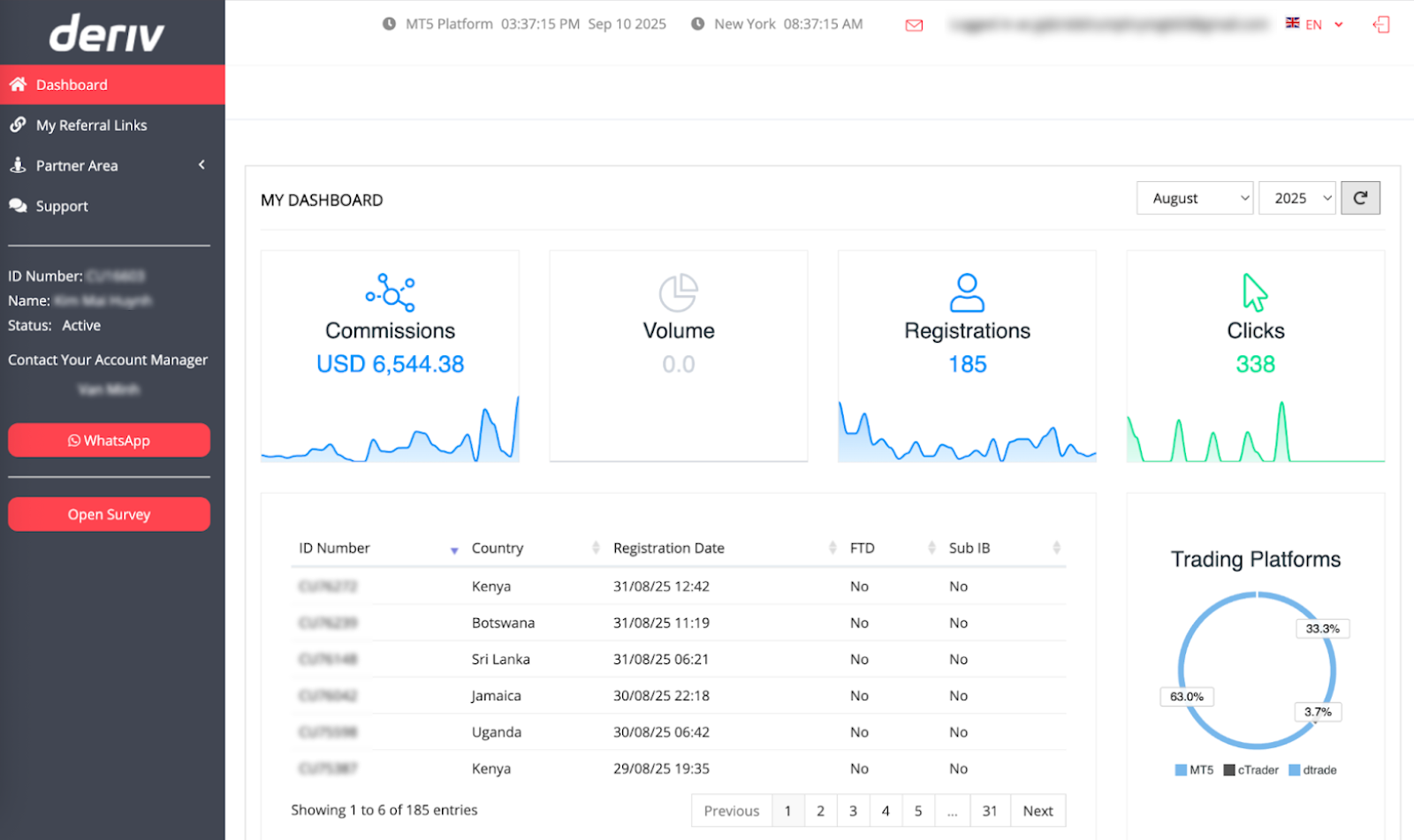
According to Claudia Casco, Education Specialist at Deriv, your Partner Dashboard serves as both your home base and performance scoreboard. Every successful partner session should begin here to quickly assess your current performance and identify opportunities for growth.
To ensure you are making decisions based on accurate, up-to-date metrics, follow this daily routine:
- Set the period: Use the date picker in the top-right corner to select the specific month and year you wish to analyse.
- Refresh data: Always click the refresh icon to load the most current performance metrics.
- Check trends: Review the daily trend charts on each performance tile to spot spikes in activity or identify patterns in your marketing efforts.
What are the key performance metrics on my Deriv Partner dashboard?
Your success is measured by four primary indicators:
- Commissions tile: Displays total earnings for the selected period across all plans.
- Registrations tile: Tracks the effectiveness of your content by showing new signups.
- Clicks tile: Shows engagement levels; combined with registrations, this helps calculate your conversion rate.
- Volume tile: While currently a placeholder in the interface, this will eventually provide deep insights into trading volume metrics.
Each performance tile includes a small daily trend chart, enabling you to identify performance spikes and spot patterns in your marketing efforts. Use these visual indicators to understand which days or periods generate your best results.
For detailed information about commission structures and how they integrate with your dashboard metrics, explore our comprehensive commission guide.
How do I generate and manage Deriv referral links?
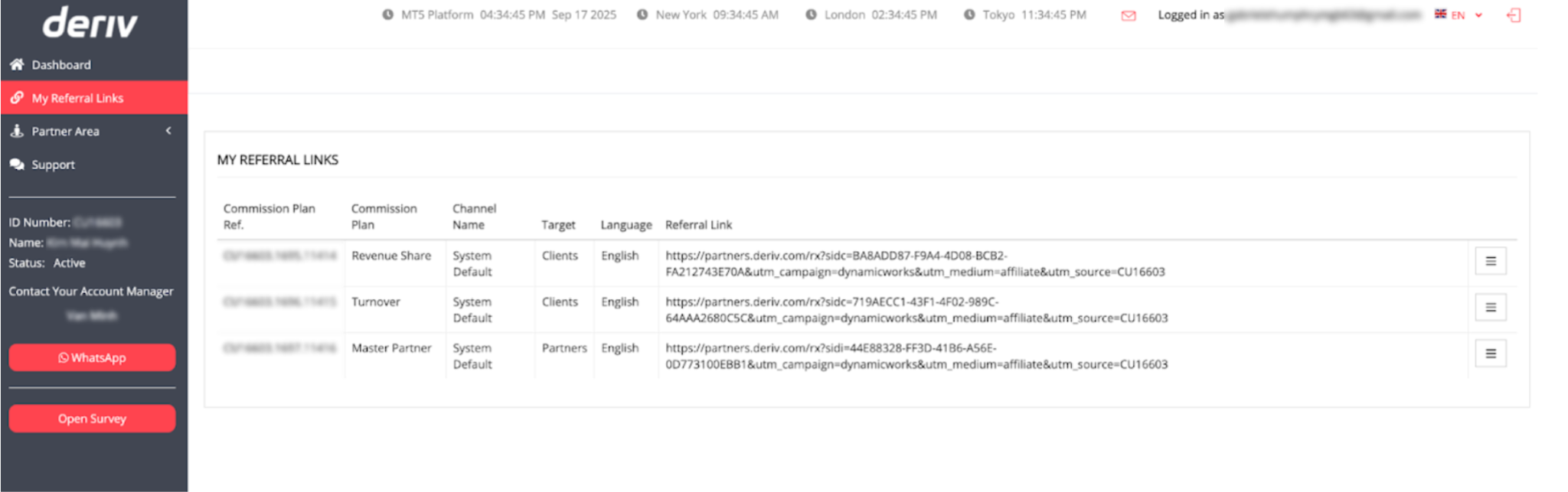
Navigate to "My Referral Links" in the sidebar to access your revenue-generating tools. Each link represents a unique payout model tailored to your business strategy:
Client activity analysis and insights
Latest registrations table
The Latest Registrations section provides detailed insights into your newest referred clients:
- Country data: Shows the geographic distribution of your signups, helping you understand which regions respond best to your promotional efforts.
- Registration timing: Displays when each signup occurred, useful for identifying peak performance periods and optimising your posting schedule.
- FTD (First Time Deposit) markers: Indicates which new registrations have made their initial deposit, a crucial milestone for commission generation.
- Sub-IB indicators: Shows which registrations are sub-partners rather than trading clients, important for Master Partner commission tracking.
Trading platforms breakdown chart
The right-side chart displays how your referred clients distribute across Deriv's various trading platforms:
- Platform performance insights: Understand which Deriv platforms (Deriv MT5, Deriv cTrader, Deriv Trader, etc.) attract your audience most effectively.
- Campaign optimisation opportunities: Focus your educational content and promotional strategies on the platforms your audience prefers.
- Content planning guidance: Create platform-specific tutorials and guides based on where your referred clients show the most activity.
Navigating your Deriv partner dashboard sidebar tools
Dashboard main page
Your central hub for quick performance overviews and daily metric monitoring. Return here regularly to track trends and identify opportunities.
Partner Area
Access advanced partnership tools, including sub-partner management, detailed commission breakdowns, and Master Partner network tracking.
Support resources
Direct access to help documentation, troubleshooting guides, and contact information for technical assistance.
Account manager connection
Quick communication channel with your dedicated account manager for personalised partnership guidance and strategy optimisation.
Deriv referral links: creating and managing your promotional assets
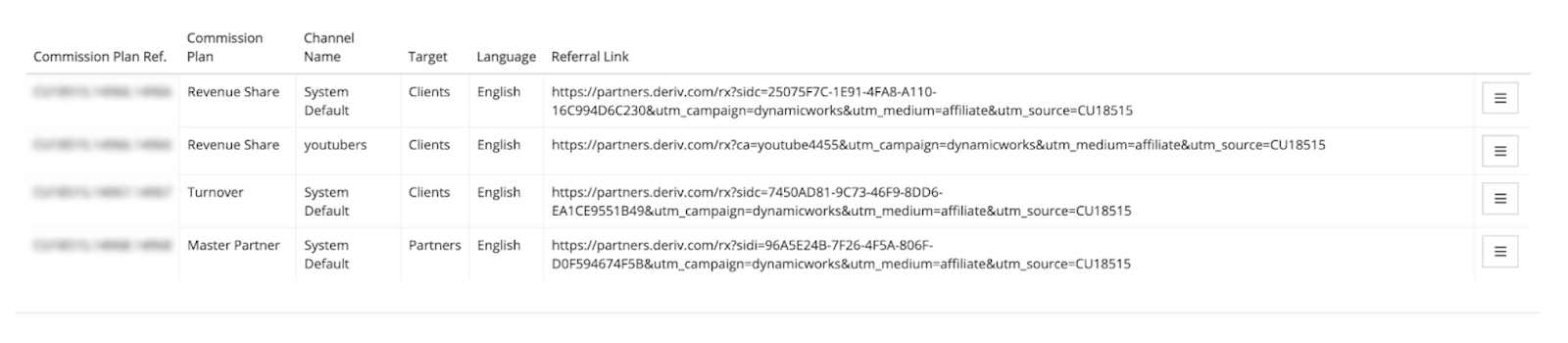
Navigate to "My Referral Links" in the left sidebar to access your primary revenue-generating tools. This section can transform your promotional efforts into trackable, commission-earning campaigns.
Link components explained
Commission Plan: The payout model for each link (Revenue Share, Turnover, or Master Partner).
Channel Name: Initially displays as "System Default" but can be customised for campaign tracking. Custom channels enable you to identify which promotional sources yield the best results.
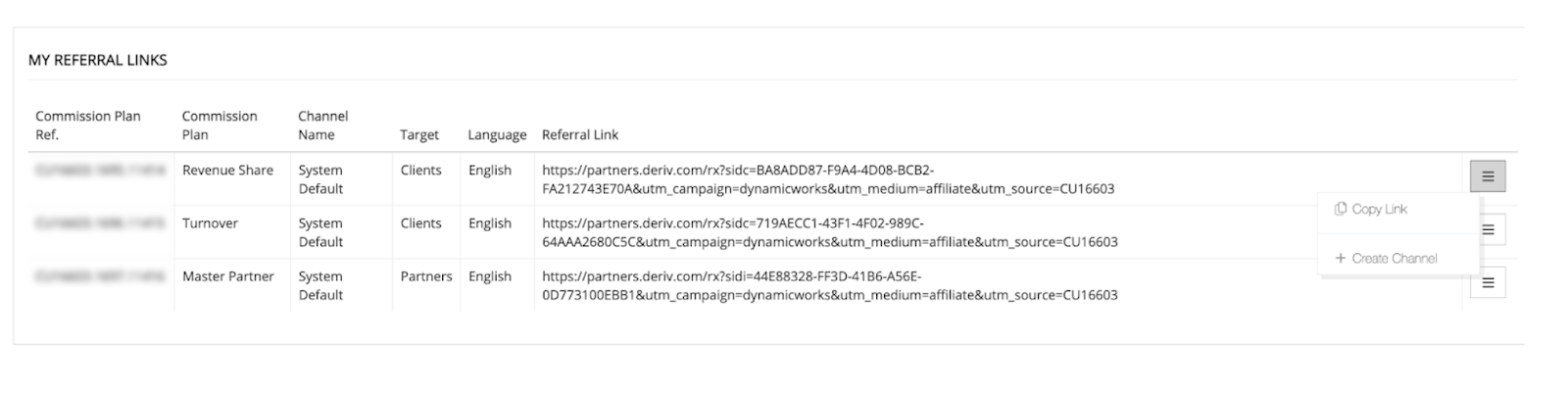
Target and Language settings: Indicates whether the link targets potential clients or sub-partners, as well as the landing page language for the Deriv registration site. Match these settings to your audience's preferences and location.
Referral Link URL: The actual link you'll share across your promotional channels. Each link contains unique tracking identifiers that ensure proper commission attribution.
How can I track specific partner campaigns with custom channels?
Custom channels can transform generic links into powerful business intelligence tools. Use them to compare performance between platforms like TikTok, YouTube, or email campaigns.
When to create custom channels
- Platform-specific campaigns: Create separate channels for TikTok, YouTube, Instagram, WhatsApp groups, or email campaigns to compare performance across social media platforms.
- Content type tracking: Use different channels for educational content versus promotional posts to understand which approach generates better long-term client value.
- Geographic targeting: Set up region-specific channels when promoting to different countries or languages to optimise your local marketing strategies.
- Influencer collaboration: Create dedicated channels for each influencer partnership or affiliate collaboration to track ROI and performance.
Step-by-step channel creation process
- Choose your commission plan based on your promotional strategy. Select client-focused plans (Revenue Share or Turnover) for trader acquisition campaigns, or Master Partner for sub-affiliate recruitment.
- Click the three-dot menu next to your chosen commission plan and select "Create Channel" to open the configuration form.
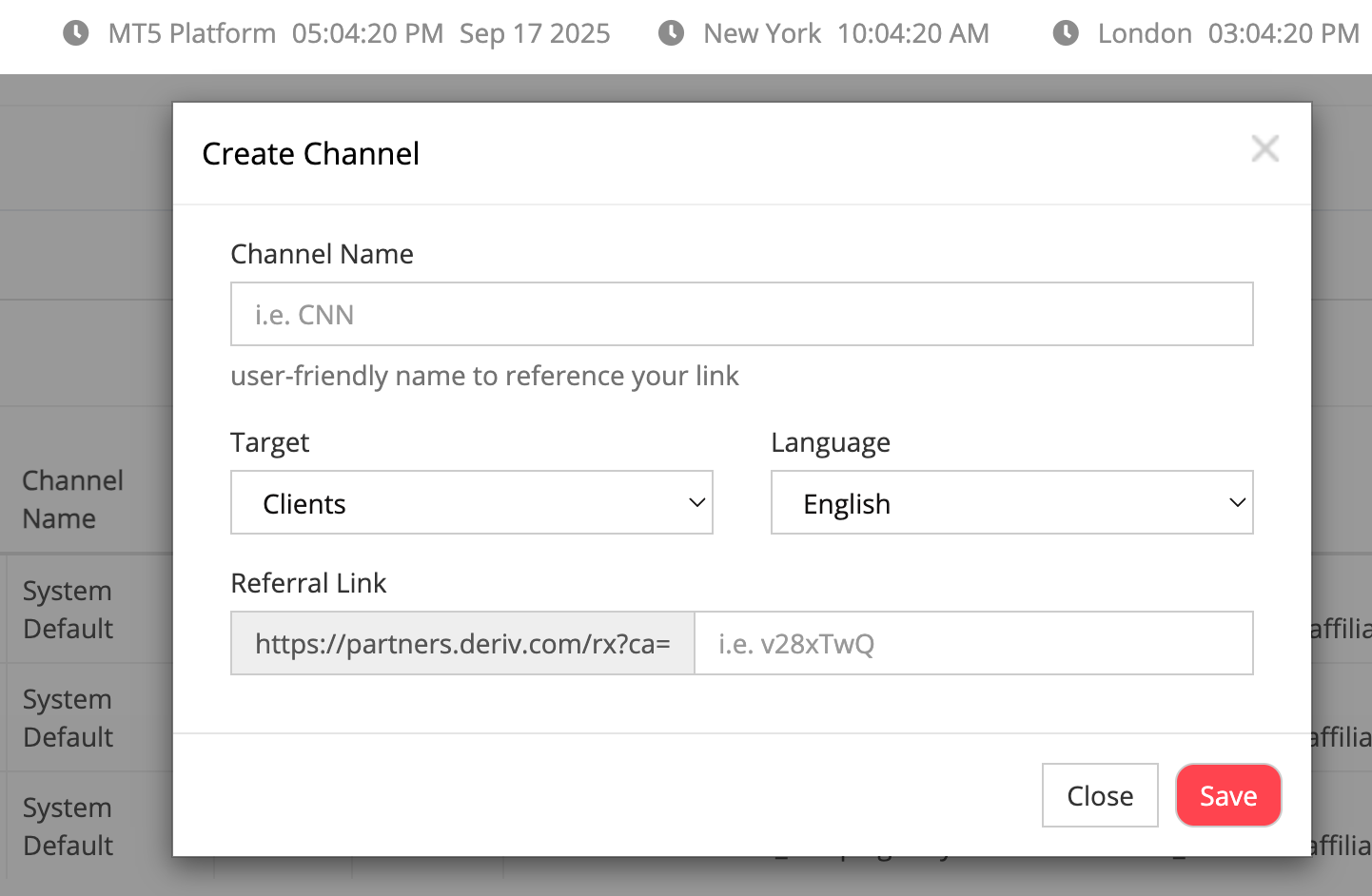
- Enter your Channel Name using a descriptive, recognizable label. Use formats like "tiktok_clients," "youtube_review," or "whatsapp_groupA." Keep names short and use underscores or dashes instead of spaces for better tracking organization.
- Set your Target audience (Clients or Partners) to match your campaign goals. This ensures proper landing page optimisation and commission attribution.
- Choose the appropriate Language for your audience. This determines the language of the Deriv registration site your referrals will see, improving conversion rates for non-English audiences.
- Review your generated Referral Link, which now includes your unique channel tracking code. This identifier ensures the system properly credits your account and tracks performance for this specific channel.
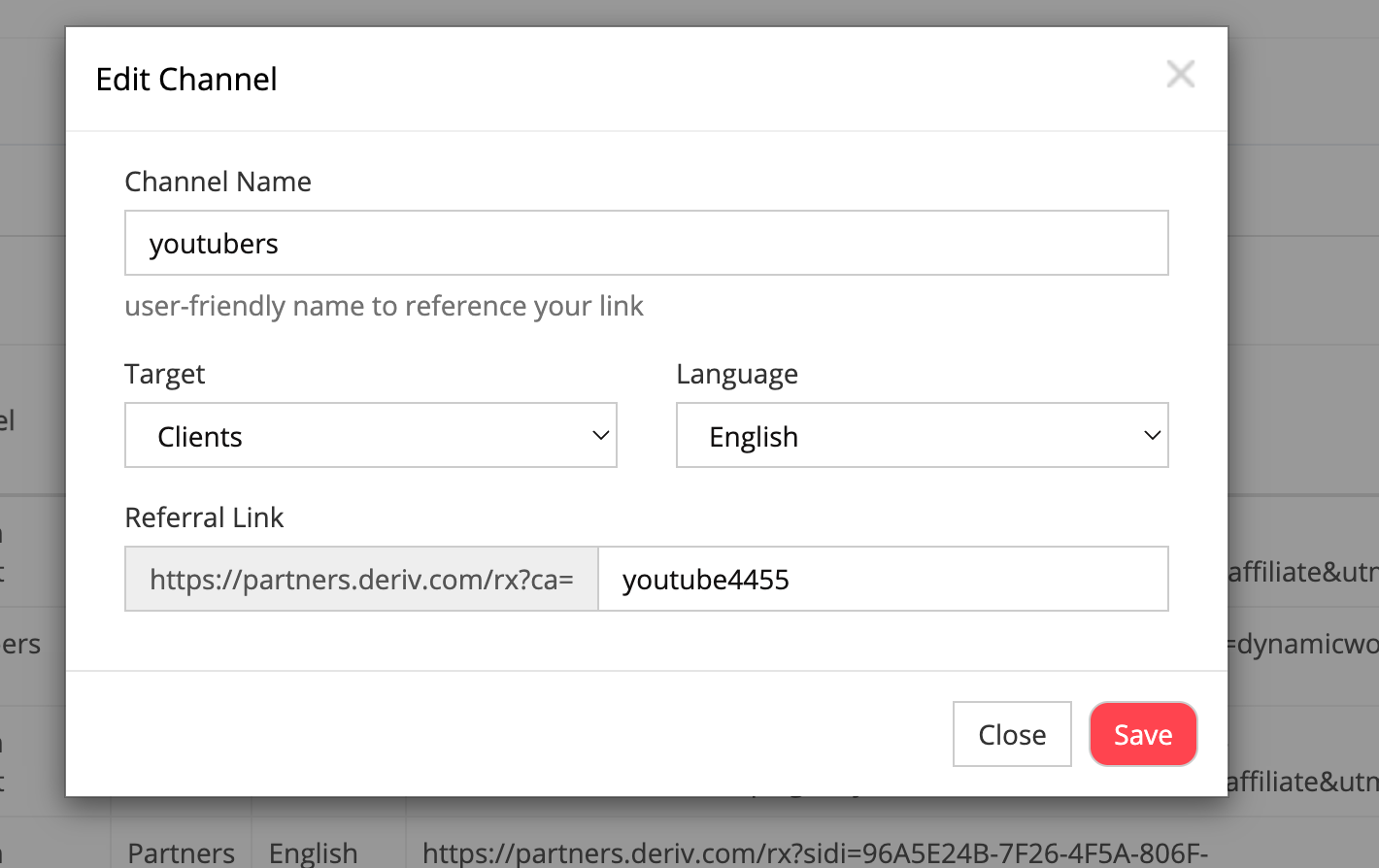
- Click "Save" to create your new channel. It will appear as a separate row in your referral links table with your custom Channel Name.
Performance optimisation strategies
Daily monitoring routine
Check your performance tiles each morning to understand overnight activity and plan your daily promotional efforts accordingly.
Weekly analysis sessions
Review your Latest Registrations and Trading Platforms data weekly to identify trends and adjust your content strategy for the following week.
Monthly optimisation
Analyse channel performance monthly to identify your highest-converting promotional strategies and reallocate effort toward your most successful campaigns.
Strategic planning
Use dashboard insights to plan quarterly content calendars, partnership strategies, and promotional campaigns based on proven performance data.
Troubleshooting and best practices
Common issues and solutions
- Data appears outdated: Use the refresh button and verify your selected date range covers the intended analysis period.
- Missing registration credits: Ensure you're using the correct referral links and that clients complete registration through your specific tracking URLs.
- Commission discrepancies: Compare dashboard data with commission emails and contact support for any significant discrepancies in reporting.
Best practices for staying organised
- Consistent naming conventions: Develop a systematic approach to channel naming that makes it easy to identify campaigns weeks or months later.
- Regular performance review: Monitor each channel's conversion rates and commission generation to identify your most effective promotional strategies.
- Campaign optimisation: Pause or modify underperforming channels and double down on high-converting promotional approaches.
Your Partner Dashboard transforms from an overwhelming interface into a powerful business intelligence tool when you understand each section's purpose and capabilities. Regular engagement with these features can improve your promotional strategies and maximise your commission potential over time.
Important disclaimers
- Commission amounts vary significantly based on individual effort, market conditions, and client trading behaviour
- Trading involves substantial risk, and referred clients may lose their deposits
- Dashboard metrics and commission rates are subject to change based on market conditions and regulatory requirements
This guide contains information current as of the date of publication - always verify current terms in your partner dashboard.
FAQs
How often should I check my Partner Dashboard?
Check daily performance tiles for quick updates and conduct weekly detailed analysis of registrations and platform data to optimize your promotional strategies.
Can I create unlimited tracking channels?
While there's no specified limit, focus on creating channels that serve distinct tracking purposes rather than creating excessive channels that complicate your analysis.
Why isn't my Volume tile showing data?
The Volume metric is currently unavailable in the partner dashboard interface but will be added in future updates to provide trading volume insights.
How do I know which commission plan to use for each channel?
Choose Revenue Share for long-term relationship building, Turnover for active trader audiences, and Master Partner for affiliate recruitment campaigns based on your promotional goals.

Quiz