How Deriv partner tracking and referral attribution work
A practical guide to tracking cookies, onboarding sequences, and verifying client IDs within your affiliate partner dashboard.
Client attribution is the process by which Deriv links a new trader account to the partner who referred them. It is the core operational mechanism that allocates commissions based on referral tracking data. When attribution executes correctly, referred clients are automatically linked to your partner profile, and eligible activity generates commission according to your selected payment model. If tracking parameters are interrupted before signup is completed, the client will not link to your partner profile, resulting in lost revenue.
Quick summary
- Automated mechanics: Attribution begins when a trader clicks your unique referral link and ends upon complete account registration.
- Tracking infrastructure: Your referral link drops a technical tracking cookie into the visitor's browser to hold your partner ID identifier.
- Disruption threats: Clearing cookies, utilising private/incognito browsing, switching devices, or navigating directly to the core domain breaks the tracking sequence.
- Data verification: Partners can manually verify active client IDs, countries, and volumes under the Signups card and Activity reports in the Partners Hub.
Key terms to know
- Client attribution: The technical process of linking a newly created Deriv trading account to a specific partner profile, establishing who receives legal commission credit for the user's trading lifetime.
- Referral link: A unique tracking URL assigned to your partner account containing your partner ID. It drops tracking cookies to sync a prospect's browser sessions with your dashboard.
- Tracking cookie: A temporary data file stored in the visitor’s web browser when they click your referral link. It preserves your unique partner ID parameters for system confirmation during account registration.
- Client tagging: The programmatic moment a new account is successfully paired with your partner profile inside the database, adding the trader to your dashboard metrics.
- Partners Hub: Your secure partner dashboard used to extract tracking codes, audit real-time referral signups, analyse traffic performance, and withdraw commission earnings.
- Client ID: A unique numerical identifier assigned by Deriv to every registered trader account. This identifier allows partners to audit active trade breakdowns securely.
How does partner attribution work from link click to payout?
Attribution typically requires all three of the following steps to be completed for a referral to be credited to you:
Step 1 — Link click: A person clicks your referral link. Deriv places a tracking cookie in their browser containing your partner ID.
Step 2 — Account creation: The person completes the Deriv signup process. Deriv reads the cookie in their browser and links their new account to your partner profile.
Step 3 — Client tagging. The new account appears in your Partners Hub Signups table, tagged to your partner ID. From this point, any commissionable activity they generate is attributed to you.
The tracking process depends on the cookie being present and readable at the moment of signup. If anything disrupts that, the account is created — but it is not linked to you.
What disrupts partner commission tracking?
Deriv partner commission tracking is disrupted whenever the tracking cookie is deleted, expired, or isolated between browser sessions. Common causes include users switching from mobile links to desktop signups, clearing browser histories, running aggressive ad-blockers, using incognito modes, or experiencing significant registration delays. If another partner's link is clicked last before registration, that final cookie overrides previous tracking parameters.
To reduce tracking issues, you should understand the key external conditions that compromise attribution cookies:
- Cleared cookies or incognito windows: If a prospect clears their local browser cache or opens a private browsing tab after clicking your link, the tracking cookie is instantly wiped before account creation occurs.
- Direct URL navigation: If a user clicks your link but closes the page, and later types deriv.com directly into a new browser tab, the original tracking link connection may be omitted.
- Cross-device gaps: If a trader clicks your link via a mobile social application but registers later on a desktop device, the mobile tracking cookie will not transfer across hardware platforms.
- Tracking conflicts (last-click rule): If a user clicks your tracking link but later clicks another partner's link before completing the registration form, the system attributes the user to the final cookie dropped.
- Extended session delays: While tracking cookies are designed to stay active to bridge the gap between initial discovery and conversion, long delays open vulnerabilities to automated browser cleaning extensions and software updates that erase tracking identifiers.
How to verify your referrals in Deriv Partners Hub
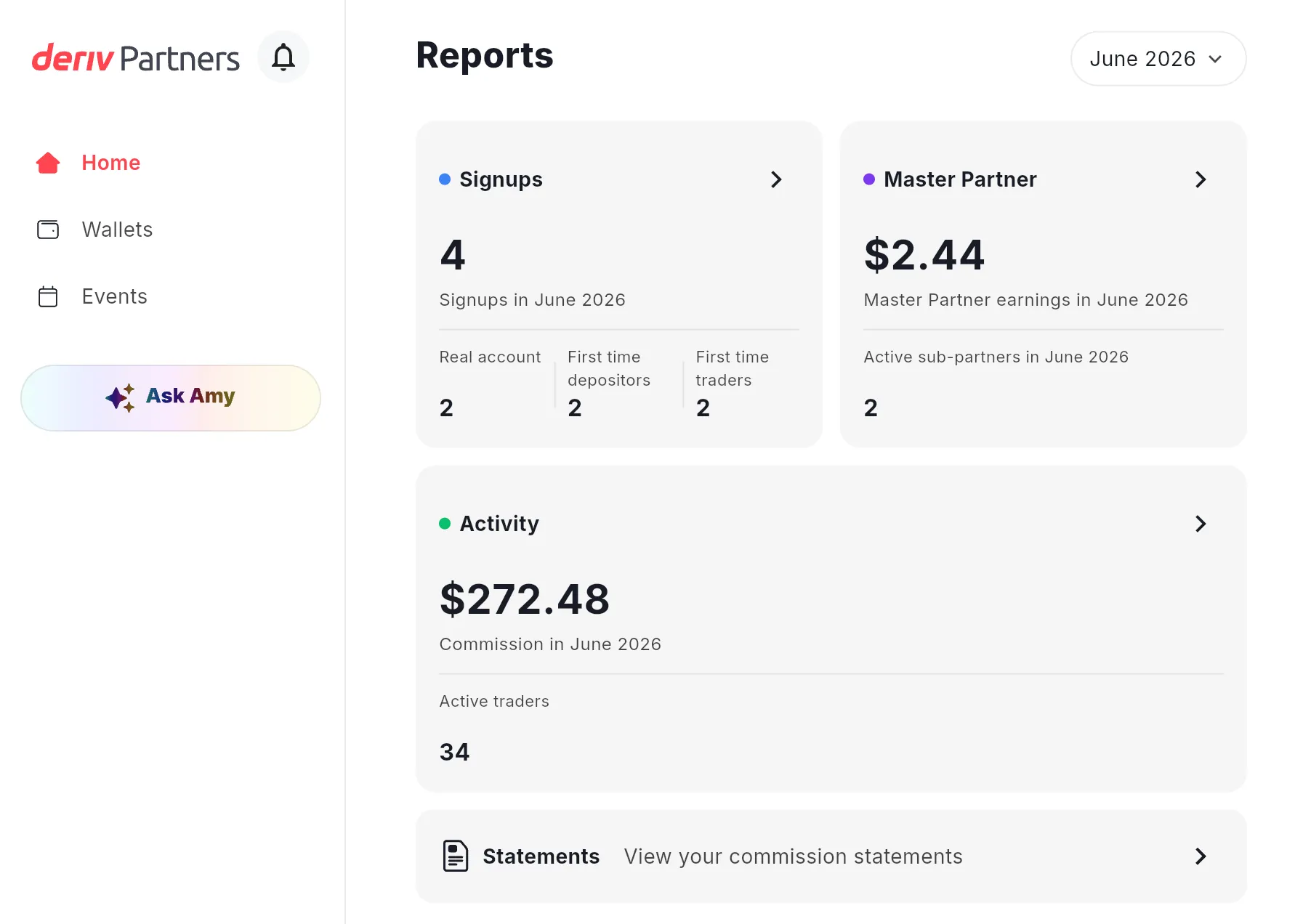
To monitor attribution performance, look under the Reports tab on your main Partners Hub page. This layout breaks your data down into two distinct operational reporting interfaces.
The Signups card: your attribution overview
The Signups card on your Home page shows how many accounts have been tagged to your partner profile in the selected month. It breaks down into:
- Real account — clients who have created a real Deriv account.
- First-time depositors — real account clients who have made their first deposit
- First-time traders — clients who have placed their first trade
This card tells you the scale of your attribution. It does not show individual Client IDs.
Illustrative figures only — not verified or representative of typical earnings.
The Activity section: where individual Client IDs live
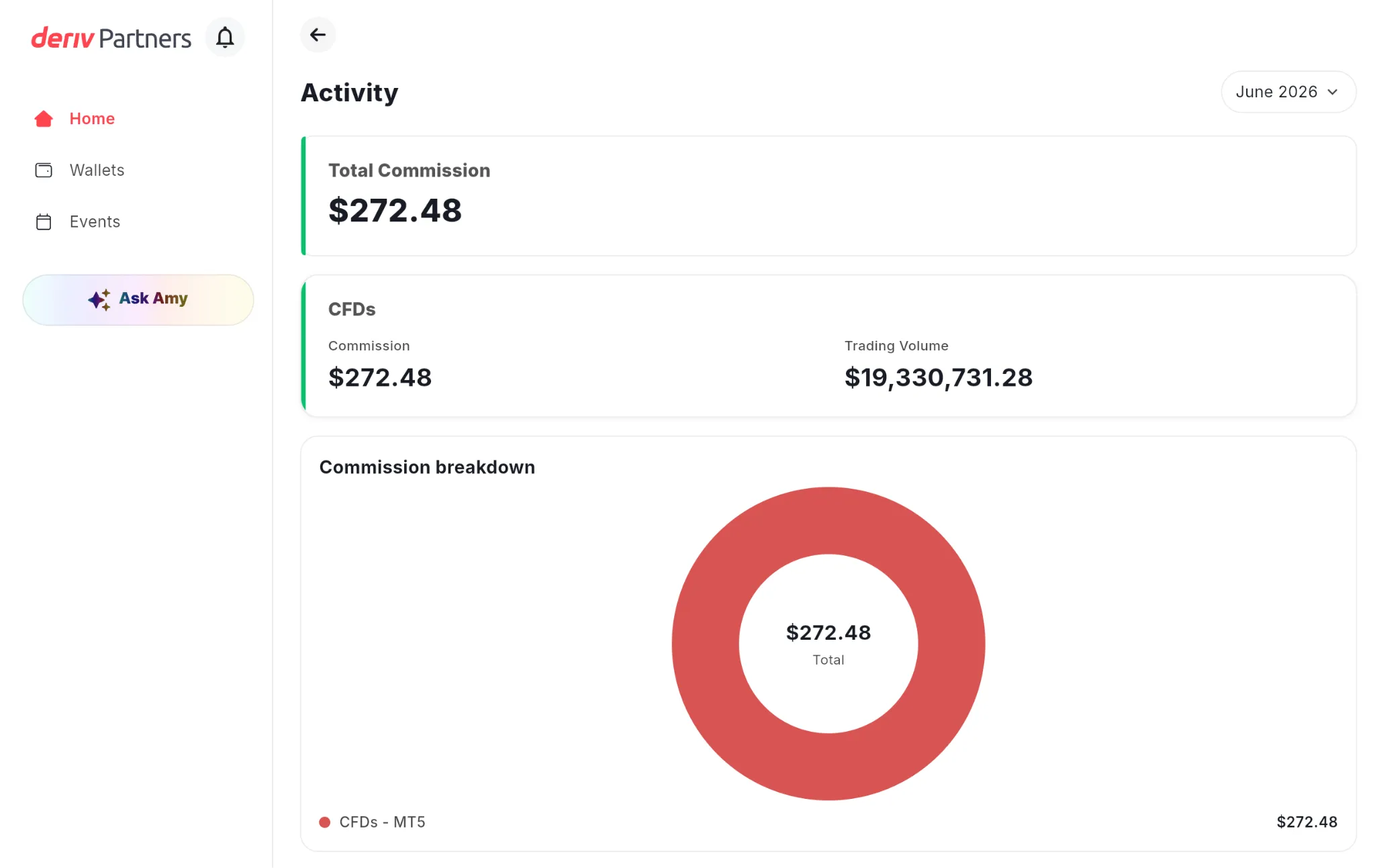
To see exactly which clients are generating volume — and to search by Client ID — go to Activity from your Home page.
- Log in to your Partners Hub and open the Home page.
- Click Activity to open the detailed view.
- Scroll to the Active Trader Breakdown table.
The chart data displayed is for illustrative purposes only. Illustrative figures only — not verified or representative of typical earnings.
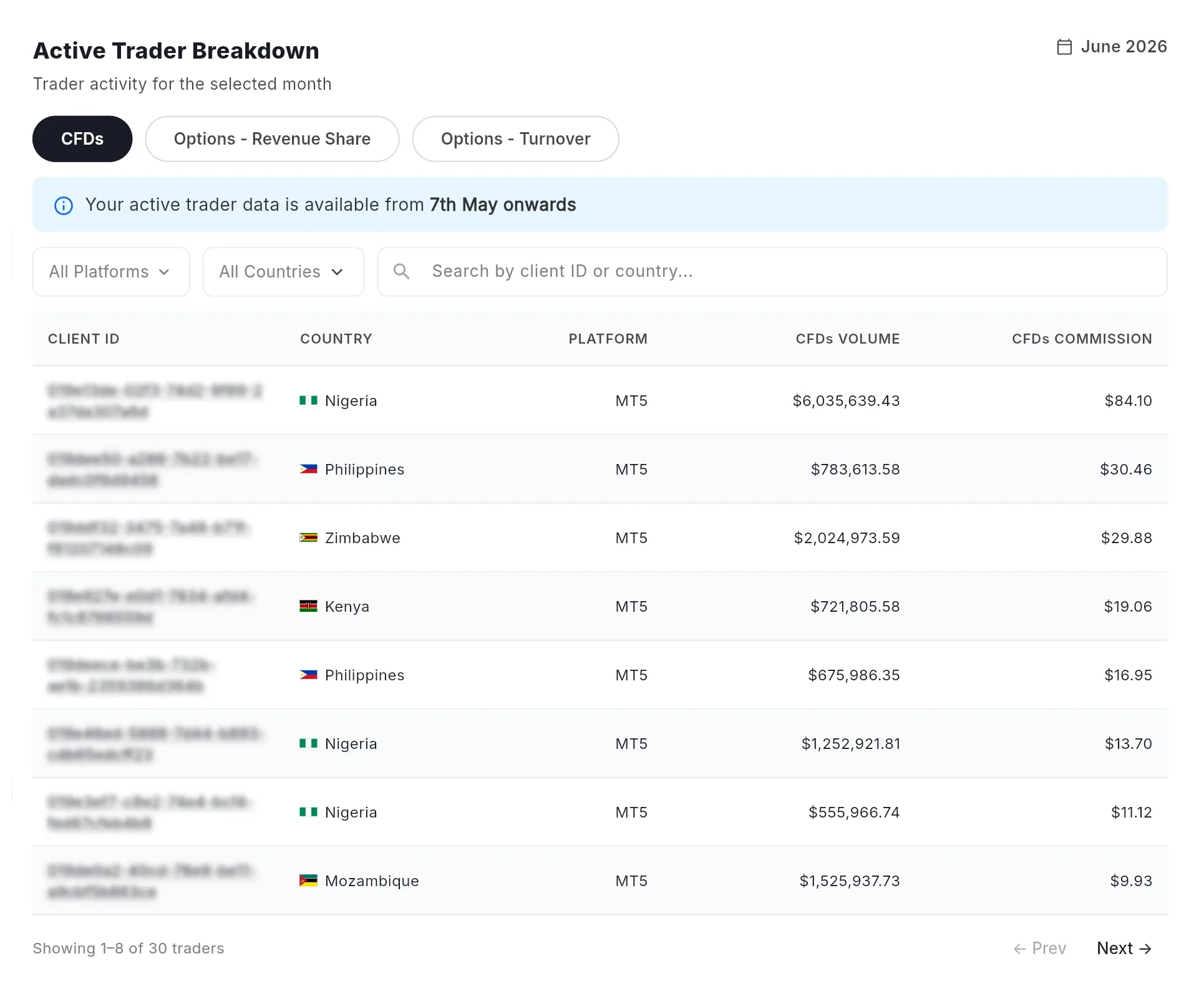
This data grid features three tabs mapped to distinct partner compensation structures: CFDs, Options - Revenue Share, and Options - Turnover. To view relevant client records, select the tab that aligns with your active contract layout.
What each column tells you
Illustrative figures only — not verified or representative of typical earnings.
The Active Trader Breakdown table displays only clients who have executed live trades within your selected dates. If a client is successfully tagged to you but has not opened a trade, they will count toward your Signups card totals but will remain hidden from your Active Trader Breakdown tables until their first trade occurs.
How can you fix broken partner link tracking and protect your traffic?
You can prevent and fix broken partner link tracking by adopting direct linking protocols and encouraging quick conversion paths. Directing prospects to copy links manually increases typing errors, while ambiguous content allows cookies to expire. Partners should distribute explicit, raw referral links matched to their specific commission structures to eliminate tracking errors.
To systematically shield your partner business from dropped cookies and optimise attribution rates, adjust your content delivery around these core practices:
Actions to implement
- Use direct, clean tracking anchors: Always present your links directly via clickable hyperlinked text. Never instruct your audience to "search for the brand" manually.
- Promote immediate onboarding actions: Encourage your network to complete their account creation process immediately after clicking your link to reduce cookie clearance risks.
- Match links to commission types: Verify you are pulling the exact tracking link built for your intended compensation path (e.g., Revenue Share links vs. Turnover links) within the Partners Hub.
Mistakes to avoid
- Avoid delay-heavy positioning: Stop building content campaigns that encourage audiences to "save this link for later use" or "bookmark this page for next month."
- Avoid raw text copy-paste steps: Do not display raw tracking strings that require manual copying and pasting. Any missed character or dropped parameter completely strips out your partner ID attributes.
Maintaining a clear understanding of client attribution ensures your promotional efforts turn into consistent earnings. By applying clean linking strategies and checking your dashboard metrics regularly, you can quickly spot tracking issues and coordinate effectively with support teams to protect your business revenue.

Quiz
FAQs