From referral link to referral funnel: scaling your Deriv Partner business
Stop pasting raw links. Learn how a structured deriv referral funnel protects tracking data and converts cold traffic.
A referral link is a digital tracking asset that identifies the source of traffic; a referral funnel is an educational framework designed to guide prospective clients towards becoming First-Time Traders (FTTs). Relying solely on a raw link provides minimal context to potential clients. By utilising a structured digital funnel, partners can provide educational resources, answer common questions, and ensure their tracking data is accurately processed.
This guide breaks down how client attribution works under the hood and provides an overview of how partnership tracking operates and how structured educational content supports user onboarding.
Quick summary
- The concept: Using a structured funnel involves introducing educational touchpoints between a user's initial interaction and their final account registration to support user understanding.
- Attribution mechanics: Deriv uses cookies to associate a referred client's trading activity with your partner identifier.
- Tracking variables: Clearing your browser cache, cross-device browsing, and standard attribution rules can affect the tracking sequence, making clear pre-registration information helpful for accurate tracking.
- Dashboard monitoring: Partners can audit individual client conversions, registration status, and geographic data within the platform's standard reporting interfaces.
Important terms to know
- Referral link: A unique tracking URL containing a specific partner identifier that associates a user's browsing session with the partner's profile.
- Referral funnel: An organised sequence of informational materials (such as educational content and landing pages) designed to guide a prospective client from initial discovery to active platform use.
- Client attribution: The technical database association of a newly registered trader account with a partner profile, establishing the source of the referral according to programme terms.
- Tracking data: A temporary cookie utilised by web browsers to preserve unique partner identifiers during a user's session.
- Client tagging: The automated database process where a newly created account is associated with a partner identifier.
- First-Time Trader (FTT): A referred client who completes the registration process, establishes a real account, places an initial deposit, and executes an initial trade.
Why can raw referral links fail to scale your referral business?
Sharing raw tracking links directly on social media platforms or messaging channels without context often leads to low engagement. This occurs because the approach fails to address the foundational information a prospective user requires before navigating a new platform.
Raw link posted ➜ User clicks link ➜ Lack of platform context ➜ User leaves page
When cold traffic is sent directly to a generic registration screen without context, conversion rates stay incredibly low. Furthermore, leaving an open window of time between a link click and an eventual registration exposes your cookie tracking to data leaks, device switching, or competing partner cookies.
Understanding the four-stage educational funnel
An educational funnel assists prospective clients by breaking down platform features into clear, logical steps. Rather than simply sharing a direct link, an educational approach introduces relevant platform features, connects specific trading tools with the appropriate user interest, and helps ensure tracking parameters are correctly processed within the session.
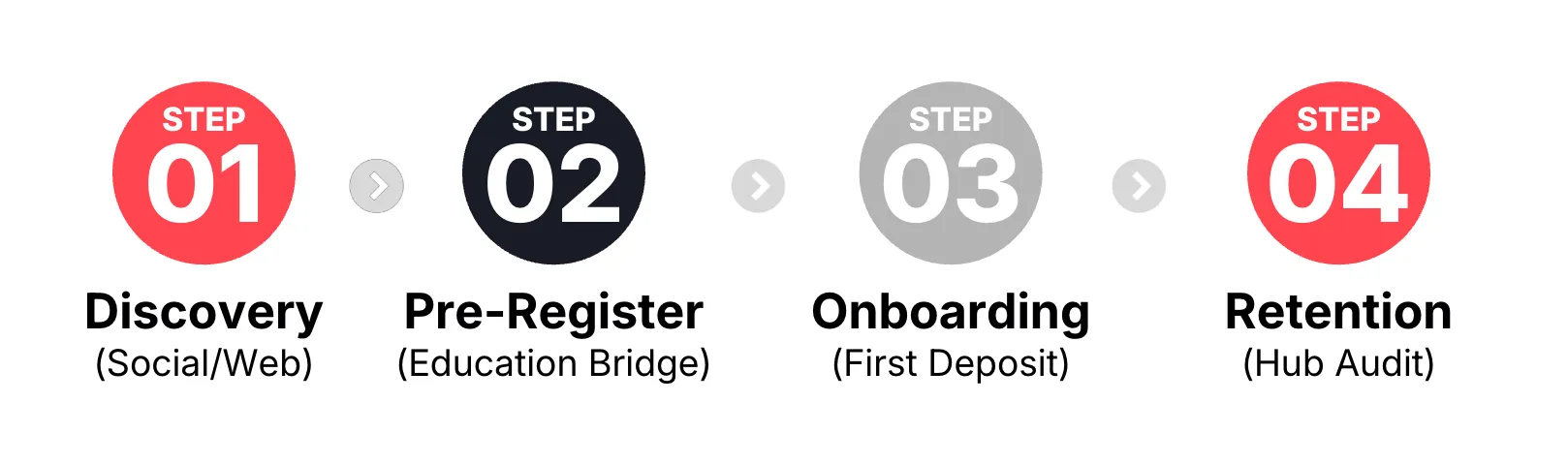
Stage 1: Introducing platform features through content
Initial introductory content focuses entirely on explaining specific platform tools and addressing common user inquiries. In digital partnership models, information is typically categorised by specific platform features rather than general overviews:
- The 24/7 market availability overview (derived indices): This involves providing information to audiences interested in continuous market access, demonstrating how derived indices simulate market movements and remain operational 24/7.
- The automation overview (Deriv Bot): This covers introductory information for users interested in automated rules, demonstrating how to configure basic parameters visually using Deriv Bot.
- Educational resources: Partners often provide introductory materials to assist users, such as downloadable PDF user guides, platform navigation checklists, or basic strategy overviews.
Stage 2: Why is a pre-registration bridge essential?
Rather than directing users from social media directly to a registration form, an informational pre-registration page or educational article provides helpful context. This page serves to answer core structural questions regarding the platform:
- Platform purpose: An environment utilised to trade customised financial instruments.
- Key characteristics: Access to specific assets like derived indices 24/7 with competitive spreads.
- Getting started: A direct path to open a virtual-funds demo account for evaluation purposes.
When users choose to navigate to the registration page from an educational site, the tracking data is processed within that active browsing session. Registering to evaluate the discussed features directly after reviewing the material helps minimise tracking discrepancies caused by device switching.
Stage 3: Supporting the transition to active platform use (BoFu)
- Following the completion of the registration process, informational materials can shift toward clear instructions regarding platform navigation. Partners can provide clear checklists to guide users from a demo environment to an active real account setup:
- Explore the demo workspace: Users can practice executing positions using virtual funds to become familiar with platform mechanics and order types.
- Complete profile verification: Users follow standard identity verification procedures within the dashboard to unlock full account capabilities.
- Fund a real account: Users complete their initial deposit using supported secure payment methods, bank transfers, or e-wallets, utilising only capital they can afford to risk.
- Launch the trading interface: Users configure their Deriv MT5 account for CFDs or open Deriv Trader to execute an initial trade, which completes the criteria for First-Time Trader (FTT) status.
Stage 4: Reviewing aggregate performance and data
Partners can review standard performance metrics inside the account workspace to understand how their educational content performs. For instance, if data indicates a high volume of registrations but minimal active trading, it suggests that the educational materials regarding platform functionality or account funding may need further detail.
Additionally, as your funnel scales, you can consider diversifying your income stream by introducing peers to Deriv's Master Partner Programme to earn on sub-partner traffic.
How to review performance metrics in the partner dashboard
To monitor how effectively educational funnels guide users, partners can analyse real-time performance metrics within the dashboard interface.
Step 1: Reviewing the main signup overview
Your main dashboard overview screen displays a real-time Signups metric box that lets you check your funnel's monthly traffic performance:

Illustrative figures only — not verified or representative of typical earnings.
- Signups: The aggregate number of registration forms processed (including both demo and real profiles).
- Real account: The number of users who have successfully established an active real account.
- First-time depositors: The number of clients who have completed an initial account funding step.
- First Time Traders (FTTs): The number of individuals who have completed their initial market trade.
Step 2: Utilising the signup breakdown for detailed analysis
If metrics indicate a clear gap between initial registrations and active real accounts, it generally shows a need for clearer onboarding documentation. To analyse these trends in greater detail, partners can access the broader data grid within the signup window.
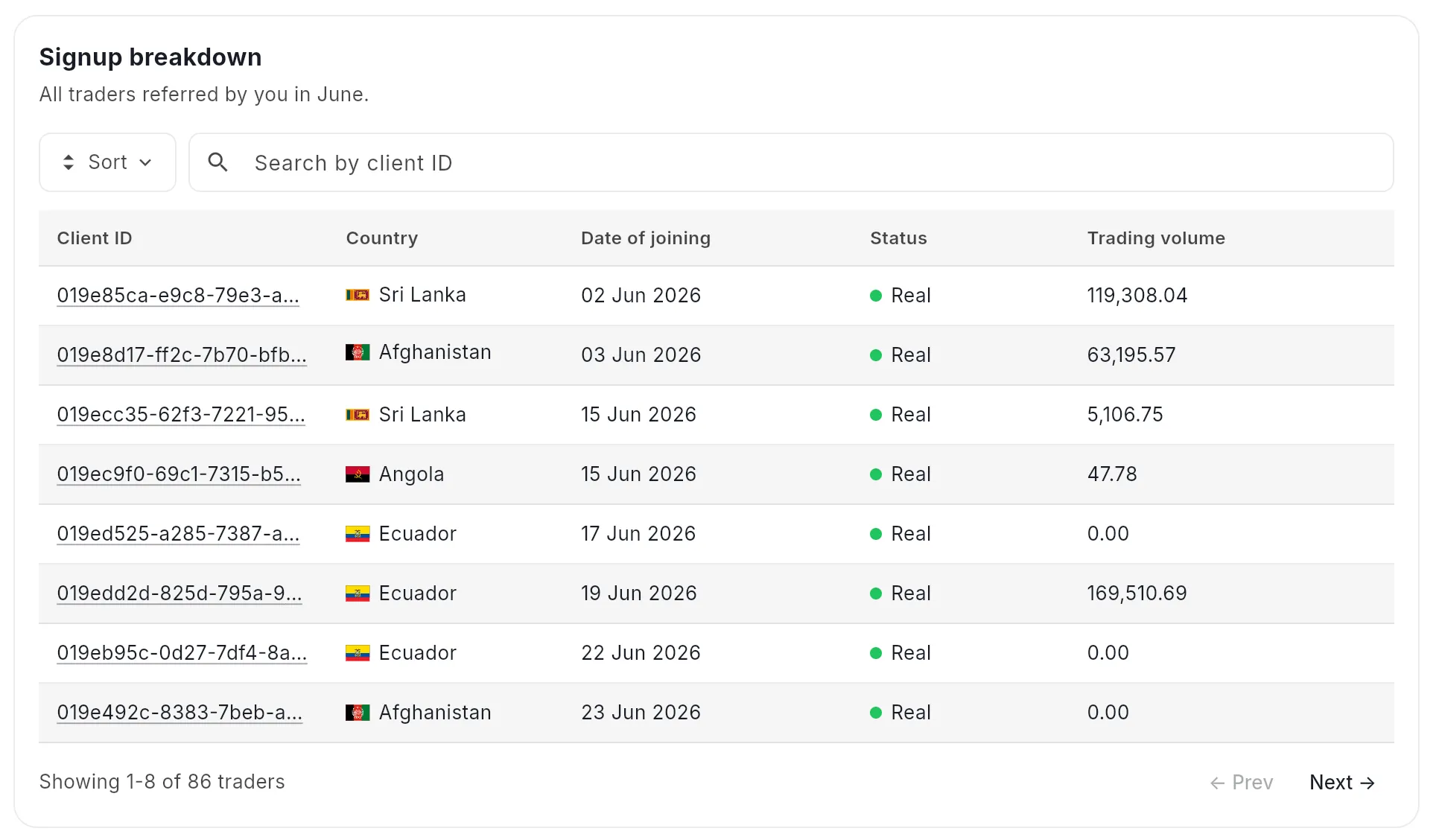
Illustrative figures only — not verified or representative of typical earnings.
The reporting interface permits the review of registration dates, country origins, and account status indicators. Referred accounts appear within these analytical tables upon registration, allowing partners to monitor aggregate onboarding trends prior to the generation of programme credits.
Standard practices for maintaining accurate tracking parameters
To support the accurate transmission of tracking parameters from the initial click to the final database registration, partners generally structure their digital content around specific standard practices:
Actions to implement
- Use direct hyperlinks: Anchor tracking URLs clearly within functional buttons or text hyperlinks.
- Encourage continuous sessions: Structure content so that users are inclined to complete the registration process within a single browsing session, minimising the likelihood of tracking files being cleared.
- Verify link configuration: Confirm that the correct link code corresponding to the intended programme terms (such as Revenue Share or Turnover models) is deployed.
Mistakes to avoid
- Avoid long delays in registration: Recommending that users bookmark links for extended periods increases the likelihood that tracking data may be affected by browser updates or device changes.
- Avoid pasting raw text strings: Displaying unlinked raw text strings forces users to copy and paste parameters manually; missing a single character alters the partner identifier attributes and prevents successful account association.
Developing a sustainable partner profile involves moving beyond the simple distribution of raw tracking links. Structuring content to guide users through clear educational material and helpful onboarding steps can help improve tracking accuracy and support your participation in the partner programme.

Quiz
FAQs